
Extension Presence indicates the availability status of an extension. Presence settings are linked to the Call Forwarding rules and Linkus ring strategy. Different call forwarding rules and ring strategy can be set for each presence status.
There are five presence status available:
- Available: The user is online and ready for communication.
- Away: The user is currently away from your office.
- DND: The user doesn’t want to be disturbed, and you won’t receive any calls.
- Lunch Break: The user is currently on lunch break.
- On a Business Trip: The user is currently on a business trip.
Note: If the presence status is set to DND (Do Not Disturb), the extension won’t receive any calls.
| Setting | Description |
| Presence Information | Enter the presence information |
| Call Forwarding | |
| Always | All the calls will be forwarded regardless of the extension status. |
| No Answer | Calls will be forwarded if the user doesn’t answer the call. |
| When Busy | Calls will be forwarded if the user is busy in a call. |
| Ring Strategy | Set the ring strategy of your Linkus Clients and IP phones. |
| Ring First | When a call reaches the extension, which terminal will ring first. |
| Ring Secondly | If the incoming call is not answered on the terminals that are selected as Ring First, the terminals that are selected as Ring Secondly will ring. |
Benefits of Extension Presence
Presence status and information allows a user to see the availability status of other users and instantly know whether the extension is available, busy, or away.
Change Presence status to quickly route incoming calls. For example, if the user is at a meeting and does not want to miss calls, set presence status to Away and forward calls to voicemail. Once the user is ready to receive calls again, switch back to Available.
How to change Presence status?
3 ways to change an extension presence.
- On the PBX Web Portal, the administrator can change presence status for all users.
- On the Extension Web Portal, users can change their own presence status.
- On the Linkus UC client, extension users can change their own presence status.
Set Call Forwarding Rules & Presence Status
Users can set call forwarding rules for each presence status. The call forwarding rules allow the user to automatically forward an incoming call to voicemail, another extension, mobile number, etc. depending on the extension presence status.
- Go to Settings > PBX > Extensions, find the desired extension, and click
 .
. - Select the Presence tab.
- In the Presence drop-down list, select the desired status you want to configure.
- In the Presence Information field, enter the a custom status message to display on Linkus. Other Linkus users will be able to see this message.
- Set call forwarding rules for the Presence status.
- Select the Call Forwarding conditions:
- Always: All the incoming calls will be forward to the destination.
- No Answer: Only the unanswered calls will be forwarded to the destination.
- When Busy: Only the calls that come in while you are talking on the phone will be forwarded.
- In the drop-down list next to the selected call forwarding condition, select the forwarding destination.
- Select the Call Forwarding conditions:
- Set the Ring Strategy for the Presence status.
- Ring First: When a call reaches the extension, which terminal will ring first.
- Ring Secondly: If the incoming call is not answered on the terminals that are selected as Ring First, the terminals that are selected as Ring Secondly will ring.
- Click “Save” and then “Apply” at the top right of your screen to complete this setting.
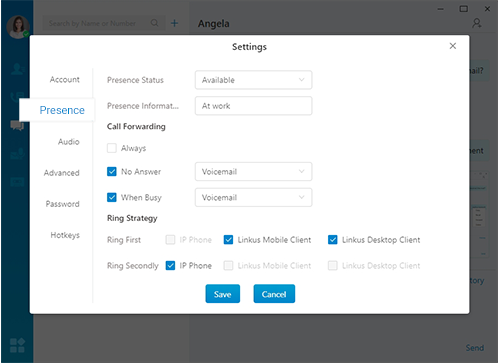
Linkus for PC
- At the bottom left corner of your Linkus Desktop Client interface, click
 .
. - Go to Settings > Presence.
- At the Presence tab, configure Presence Status, Call Forwarding rules, and Ring Strategy.
Linkus for Mobile
- Tap the profile icon on the top left of your Linkus Mobile interface.
- On the Me page, select “Current Presence”.
- Select the desired presence status, and then select
 to configure Presence Information, Call Forwarding rules, and Ring Strategy.