
Set Call Forwarding Prompt
By default, when the PBX is forwarding an incoming call to another number, the PBX will play the call forwarding prompt “please hold when I try to locate the person you are calling”, and then play the MoH music when the caller is waiting. You can disable the call forwarding prompt and change the MoH music to a normal ring tone. In this way, the caller will not realize that the call is forwarded.
- Go to Settings > PBX > Voice Prompts > Prompt Preference.
- Unselect the checkbox of Play Call Forwarding Prompt.
- In the Music on Hold for Call Forwarding drop-down list, select Ringing Tone.
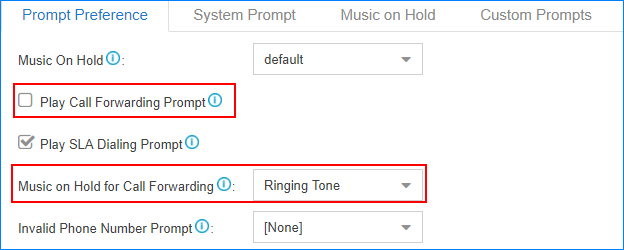
- Click “Save” and then “Apply” at the top right of your screen to complete this setting.
Activate/Deactivate Call Forwarding
Extension users can dial Call Forwarding feature codes on their phones to activate or deactivate Call Forwarding function.
Below are the default call forwarding feature codes and the description of how to use the feature codes.
| Code | Action | Example |
|---|---|---|
| *71 | Activate call forwarding ALWAYS | Dial *71 to forward all calls to voicemail.Dial *716000 to forward all calls to extension 6000. |
| *071 | Deactivate call forwarding ALWAYS | Dial *071 to deactivate call forwarding ALWAYS. |
| *72 | Activate call forwarding WHEN BUSY | Dial *72 to forward calls (when the user is busy) to voicemail.Dial *726000 to forward calls (when the user is busy) to extension 6000. |
| *072 | Deactivate call forwarding WHEN BUSY | Dial *072 to deactivate call forwarding WHEN BUSY. |
| *73 | Activate call forwarding NO ANSWER | Dial *73 to forward calls (when the user doesn’t answer) to voicemail.Dial *736000 to forward calls ((when the user doesn’t answer) to extension 6000. |
| *073 | Deactivate call forwarding NO ANSWER | Dial *073 to deactivate call forwarding NO ANSWER. |