
Installation Guide for Yeastar S-Series VoIP PBX.
About this guide
This guide describes hardware ports and indicators on the Yeastar S-Series VoIP PBX, and give instructions on how to install the PBX and telephony modules.
S412 Overview
Front Panel
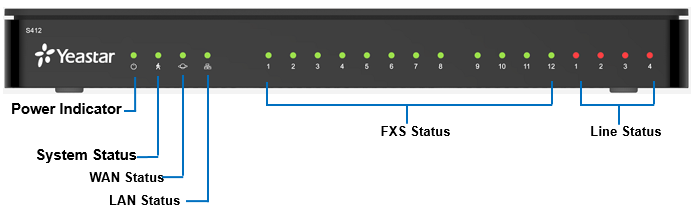
| LED | Indication | Status | Description |
|---|---|---|---|
| POWER | Power status | On | The power is switched on. |
| Off | The power is switched off. | ||
| SYSTEM | System status | Blinking | The system is running properly. |
| Static/Off | The system goes wrong. | ||
| WAN | WAN status | Static | Linked normally. |
| Blinking | In communication. | ||
| Off | Off-line. | ||
| LAN | LAN status | Static | Linked normally. |
| Blinking | In communication. | ||
| Off | Off-line. | ||
| 1-4(Line status) | GSM/3G/4G | Red: static | The GSM/3G/4G Trunk is idle. |
| Red: blinking slowly | No SIM card. | ||
| Red: blinking rapidly | The GSM/3G/4G trunk is in use. | ||
| BRI | Orange: blinking | The BRI line is disconnected. | |
| Orange: static | The BRI line is connected or in use. | ||
| FXO | Red: static | The PSTN line is idle. | |
| Red: blinking slowly | No PSTN line is connected to the FXO port. | ||
| Red: blinking rapidly | The PSTN line is busy. | ||
| 1-12(FXS port) | FXS | Green: static | The analog phone is idle. |
| Green: blinking | The analog phone is busy. |
Rear Panel
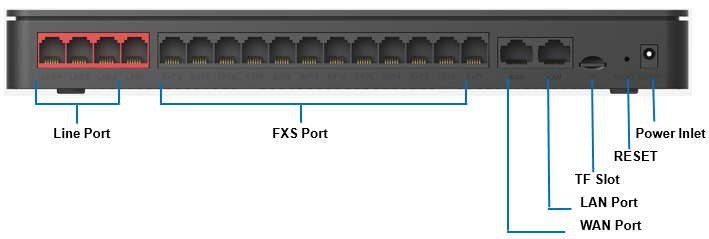
| Port | Description |
|---|---|
| RJ11(Line port) | FXO port (red light): For the connection of PSTN lines or FXS ports of traditional PBX.BRI port (orange light): For the connection of ISDN BRI lines.Note: The sequence number of the ports corresponds to that of the Indicator lights in the front panel. (I.e. the LED lights in the front indicate the connection status of the corresponding ports at the back panel.) |
| RJ11(FXS port) | FXS port (green light): For the connection of analog phones.Note: The sequence number of the ports corresponds to that of the Indicator lights in the front panel. (I.e. the LED lights in the front indicate the connection status of the corresponding ports at the back panel.) |
| WAN/LAN | Yeastar S412 provides two 10/100Mbps adaptive RJ45 Ethernet ports, and supports 3 Ethernet modes. The default mode is “Single”.Single: LAN port will be used for uplink connection. WAN port is disabled.Bridge: LAN port will be used for uplink connection. WAN port will be used as bridge for PC connection.Dual: Both LAN and WAN ports can be used for uplink connection. |
| TF Slot | Insert TF card to store auto recording files. |
| Reset Button | Press and hold for 10 seconds to restore the factory defaults. |
| Power Inlet | Connect the supplied power supply to the port. |